All Posts
A complete overview of all posts, included my English and Dutch Archive.
Een gratis Google Apps account?

Om de functionaliteit van Google Apps uit te testen, heb ik een gratis account aangemaakt. Eigenlijk had ik altijd het idee dat het om de betaalde / zakelijke versie van Gmail, Google Agenda en Google Docs ging, maar toch niet! Het staat niet echt duidelijk aangegeven dat het gratis is. …
Ubuntu: Installing Zend Framework with NetBeans

To install Zend Framework is not as straight forward like other PHP Frameworks. Also to install it with NetBeans it was not described very well on blogs.sun.com/netbeansphp site. Let’s start!
My assumption is that NetBeans is installed already on Ubuntu. I used NetBeans 6.9.1 and Ubuntu …
Tips to spindown your hard disk in Debian or Ubuntu
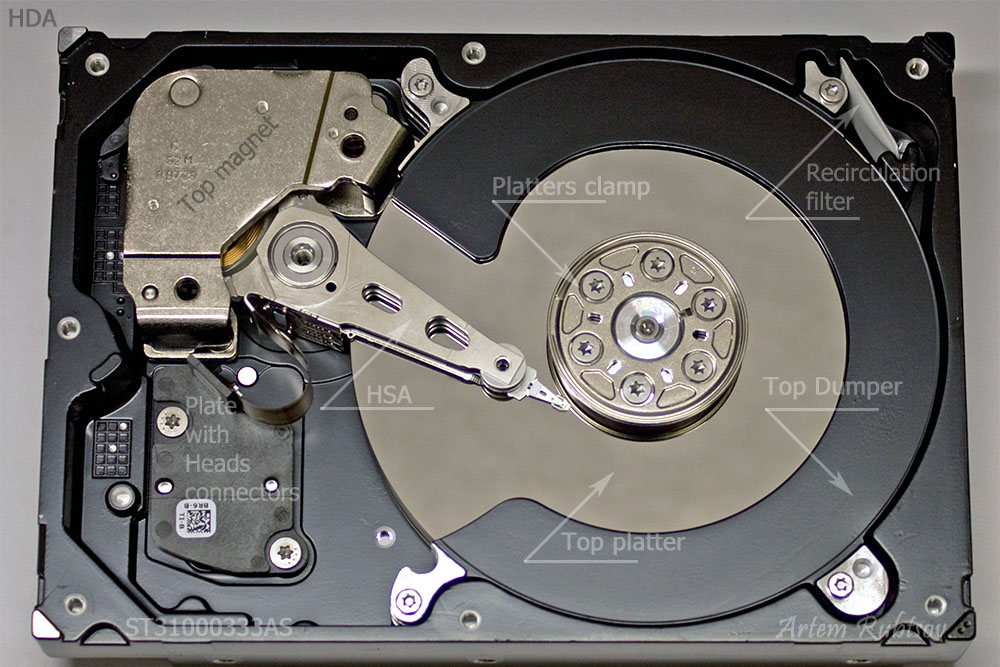
Before we are going into depth, first check if the (external) hard disk is able to go in spindown. Disable all services which has disk access periodically, for example:
$ /etc/init.d/asterisk stop
$ /etc/init.d/rsyslog stop
$ /etc/init.d/apache2 stop
$ /etc/init.d/mysql stop
$ /etc/init.d/samba …Debian root on a flash disk and the data on a hard disk
This article is about installing Debian on a flash disk, like SD card, flash disk, Solid State Disk etc. The goal is to have the data on a hard disk. This will increase the lifetime of the flash disk.
Assumption of this article is that Debian is already installed on a flash disk in the root …
Sheevaplug boot from SD card fails on power up
After installing Debian on SD card, it was booting successfully with the ‘run bootcmd’. But when I switched off the power and plugged in again, I was getting the following error messages:
Error! cmd : 8, err : 0201
Error! cmd : 1, err : 0201
Error! cmd : 1, err : 0201
Error! cmd : 1, err …Basic Debian installation and configuration
Add handy aliases
Add the following at the end of bash.bashrc:
$ vi /etc/bash.bashrc
...
alias ll='ls -l'
alias pg='ps -ef|grep'
alias vi='vim'
The last alias “vi” is to use vim instead of vi. vim is the more luxury editor ;-).
To install vim, enter the following command:
$ apt-get …Installing Debian on the SheevaPlug
The next step in this SheevaPlug guide is installing Debian on the SheevaPlug. Default on the SheevaPlug, Ubuntu 9.04 is provided. Ubuntu 9.04 will not be supported for a very long time any more and a Ubuntu 9.10 or higher is not available. That is why I want to install Debian on the Kingston 4GB …
Building the system with the eSATA SheevaPlug
The architectural setup
The following list I want to connect to my eSATA SheevaPlug:
- Flashdisk 4 GB SDHC class 4 (for the Debian root filesystem)
- Eexternal USB or eSATA hard-disk 2GB or 4GB (for datastorage and variable data)
- Network cable (supplied in kit)
- miniUSB cable for serial access to the …
How to copy and paste in PuTTY under Ubuntu?
The behaviour of copy and past in PuTTY is different than in Ubuntu. With PuTTY under Windows I never had a problem how to copy and paste, but under Ubuntu I am always confused. That is why I wanted to write it down. For me, but also for you of course.
Coping from PuTTY
Select the text with the left …